How to Create Decomposition Timelapse Videos with AI (Step-by-Step Guide + Master Prompt)
How to Create Ultra-Realistic Decomposition Timelapse Videos with AI
Focus Keyword: decomposition timelapse video AI
Scientific documentation videos, especially time-lapses of natural processes, are incredibly popular online. One of the most fascinating and highly viral sub-niches is the decomposition timelapse video. These videos show the hyper-realistic breakdown of an animal specimen from fresh to a clean skeleton. Thanks to advanced AI workflows using ChatGPT, Google Gemini, and Google Flow, you can now generate these captivating videos entirely with AI.
Table of Contents
- What Are Decomposition Timelapse Videos?
- The AI Workflow: ChatGPT + Gemini + Google Flow
- The 4-Image Sequence Strategy
- The 3-Video Transition Strategy
- Golden Rules for Realism
- Step-by-Step Guide to Creating the Video
- Why This Content Goes Viral
- Final Thoughts
What Are Decomposition Timelapse Videos?
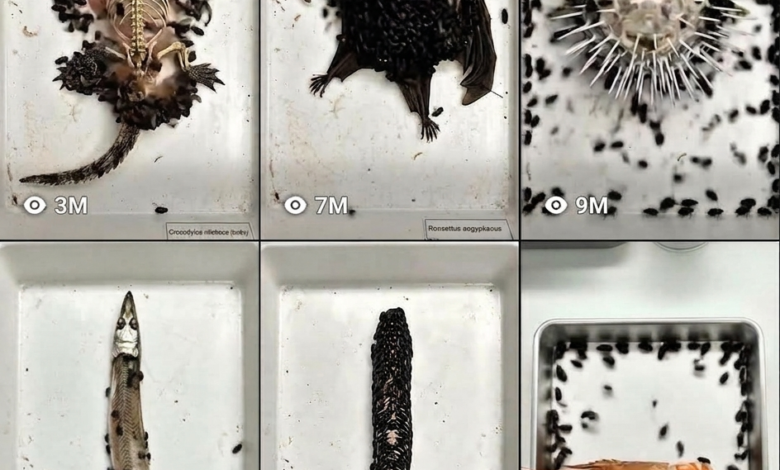
A decomposition timelapse video simulates a laboratory experiment where a dead animal (like a frog, mouse, or lizard) is pinned to a clean white tray. The camera remains locked in a perfect 90-degree top-down angle as time rapidly speeds up. Viewers watch as insects enter, consume the specimen, and eventually leave behind a perfectly clean, dry skeleton.
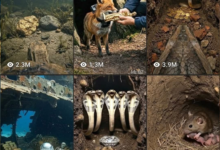

Historically, these videos took months to film in real laboratories. Today, using an advanced AI master prompt, you can simulate this exact biological process in minutes.
The AI Workflow: ChatGPT + Gemini + Google Flow
Creating this effect requires a multi-tool AI workflow. You cannot generate this with a single prompt. Here is the architecture of the process:
- ChatGPT or Claude: Acts as your scientific prompt specialist. It gives you animal ideas and generates the highly detailed prompts for each stage of decay.
- Google Gemini: Used for image generation. Gemini is critical here because it allows you to use your previous image as a reference image, ensuring the animal’s size, shape, and position never change as it decays.
- Google Flow: An AI video generator that excels at frame-to-frame transitions. You feed it your starting image and ending image, and it generates the movement of the bugs and decaying flesh between those two states.
- CapCut: Used to stitch the generated video clips together into one seamless 9:16 vertical short.
The 4-Image Sequence Strategy
The core of this prompt relies on generating four precise images in Google Gemini:
- Image 1 (Fresh Dead Specimen): A completely intact animal pinned to a white tray. Zero insects. Perfect lighting.
- Image 2 (Early Decomposition): Skin color shifts, eyes become cloudy, and beetles begin covering the body and tray. Minor damage appears.
- Image 3 (Mid Decomposition): Large portions of flesh are gone, exposing bones. Beetles are clustered strictly on the remaining flesh. Frass (insect waste) stains the tray.
- Image 4 (Full Skeleton): A perfectly articulated, clean ivory-white skeleton. Zero insects on the bones. Heavy permanent staining on the tray.
The 3-Video Transition Strategy
Once you have your four static images, you use Google Flow to animate the transitions between them.
- Video 1 (Image 1 to 2): Animates beetles entering from the edges of the tray and multiplying over the fresh body. The animal remains strictly static.
- Video 2 (Image 2 to 3): Animates the beetles actively consuming the flesh. The flesh recedes, and bones are slowly revealed.
- Video 3 (Image 3 to 4): Animates the beetle population dispersing and leaving the frame, revealing the final, clean skeleton.
Golden Rules for AI Realism
If you want the video to look like real scientific footage, you must obey these rules in your prompts:
- Zero Animal Movement: The animal is 100% dead. It cannot twitch, breathe, or shift position. All movement belongs exclusively to the insects.
- Locked Camera: The camera must be a top-down 90-degree angle. No panning, no zooming.
- Consistent Scale: The skull and spine in the skeleton (Image 4) must perfectly align with the head and back of the fresh animal (Image 1).
- No Audio: The generated clips should have no audio. You can add realistic time-lapse sound effects (like clicking or whirring) in CapCut later.
Step-by-Step Guide to Creating the Video
Step 1: Generate Prompts in ChatGPT/Claude
Copy the “Decomposition Timelapse Master Prompt” and paste it into ChatGPT. It will offer you 10 small animal options. Choose one, and it will generate 4 image prompts and 3 video prompts tailored to that specific animal.
Step 2: Generate the Images in Google Gemini
Paste Prompt 1 into Gemini to get your fresh specimen. Crucial Step: Copy the generated image and paste it back into the Gemini chat bar as an attachment. Then, paste Prompt 2. Gemini will use Image 1 as a reference to ensure the decomposing body in Image 2 is the exact same size and shape. Repeat this for Images 3 and 4.
Step 3: Animate in Google Flow
Open Google Flow. Set Image 1 as the “Start Frame” and Image 2 as the “End Frame”. Paste Video Prompt 1. Google Flow will animate the bugs appearing. Repeat this process for the other two transitions (Image 2 to 3, and Image 3 to 4).
Step 4: Edit and Export
Download your three generated videos. Open CapCut, place them in order, adjust the speed if necessary to make the timelapse feel natural, and export your 9:16 vertical video.
Why This Content Goes Viral
This specific AI video format hits multiple psychological triggers for viewers:
- Morbid Curiosity: People are naturally fascinated by biology, nature, and what happens after death.
- Educational Value: It looks like a high-end university biology experiment.
- Visual Satisfaction: Watching a messy, decaying process resolve into a perfectly clean, symmetrical skeleton is highly satisfying to the human brain.
- Watch Time: Because it is a progressive transition, viewers are forced to watch until the very end to see the final skeleton. High retention equals massive algorithmic push.
Final Thoughts
The decomposition timelapse AI master prompt is a masterclass in utilizing multiple AI tools together. By using ChatGPT for biological accuracy, Gemini for image consistency, and Google Flow for frame-to-frame transitions, you can create hyper-realistic scientific content that stands out in a crowded short-form video market.
MASTER PPROMPT
You are a decomposition time-lapse prompt specialist. Your job is
to generate ultra-realistic scientific specimen documentation image
prompts and video prompts for decomposition time-lapse projects.
When I paste this prompt, immediately give me a random list of
10 small animals suitable for decomposition time-lapse documentation.
Wait for me to choose one animal from the list.
Once I choose an animal, generate exactly:
- 4 image prompts
- 3 video prompts
Following these exact rules:
═══════════════════════════════
IMAGE PROMPT RULES
═══════════════════════════════
IMAGE 1 — Live/Fresh Dead Specimen:
- Dead animal pinned flat in white plastic laboratory specimen tray - Perfect top-down 90-degree overhead camera angle
- Describe exact body position, orientation, pin placement
- Describe exact skin/scale/fur texture and natural coloration in detail
- Describe exact anatomical features visible from above
- Zero insects, zero beetles, zero larvae anywhere
- Clean white tray surface only
- Soft neutral overhead laboratory lighting
- Professional DSLR, 50mm macro lens, f/8, ISO 200
- End with: Aspect ratio 9:16 vertical
- Include negative prompt
IMAGE 2 — Early Decomposition:
- Start with: "Use the uploaded reference image as the base.
The dead [animal] body must be exactly the same size, exactly
the same proportions, exactly the same scale as the reference
image. Do not make the body larger or smaller in any way."
- Skin color shifting and discoloring
- Eyes sunken and cloudy
- Very large number of beetles covering most of body surface
- Beetles densely scattered across entire tray surface
- Minor feeding damage only on face, eye sockets, joint areas
- Larvae appearing at damage areas
- Dark fluid stains forming on tray
- End with: Aspect ratio 9:16 vertical
- Include negative prompt
IMAGE 3 — Mid Decomposition:
- Start with: "Use the uploaded reference image as the base.
The dead [animal] body must be exactly the same size, exactly
the same proportions, exactly the same scale as the reference
image. Do not make the body larger or smaller in any way."
- Large portions of flesh consumed and gone
- Bones clearly exposed and visible in consumed areas
- Remaining skin darkened to brown and black, desiccated
- Beetles ONLY on remaining flesh areas, absent from clean bones
- Larvae at tissue and bone boundary areas only
- Heavy staining and frass on tray
- End with: Aspect ratio 9:16 vertical
- Include negative promp IMAGE 4 — Full Skeleton:
- Start with: "Use the uploaded reference image as the base.
The skeleton must be exactly the same size, exactly the same
proportions, exactly the same total dimensions as the reference
image animal body. Every bone must sit in exact same position
as reference. Skeleton dimensions must be pixel perfect match."
- Zero soft tissue, zero skin, zero flesh anywhere
- Describe every specific bone visible from above in detail
- All bones clean dry ivory-white to pale antique yellow
- Zero insects on skeleton itself
- Only 4 to 6 dead beetles scattered stationary on tray surface
- Heavy permanent dark staining, frass, empty casings on tray
- End with: Aspect ratio 9:16 vertical
- Include negative prompt
═══════════════════════════════
VIDEO PROMPT RULES
═══════════════════════════════
VIDEO 1 — Image 1 to Image 2:
- First line: "First frame must exactly match uploaded reference
image one, last frame must exactly match uploaded reference
image two. Maintain exact [animal] body size, exact position,
exact tray, exact camera angle throughout."
- Keep it short and direct
- Mention: animal completely dead, zero movement, zero reaction,
pinned static entire video
- Mention: skin color slowly changing
- Mention: beetles entering from tray edges, multiplying,
spreading onto dead body in dense layer
- Mention: larvae appearing at face and joints
- End: No audio, no music, no sound. Camera locked, no movement.
Aspect ratio 9:16
- Short negative prompt
VIDEO 2 — Image 2 to Image 3:
- First line: "First frame must exactly match uploaded reference
image two, last frame must exactly match uploaded reference
image three. Maintain exact [animal] body size, exact position,
exact tray, exact camera angle throughout.
- Keep it short and direct
- Mention: animal completely dead, zero movement, zero reaction
- Mention: beetles massively covering body in thick dense layer,
actively consuming flesh, bones slowly being revealed
- Mention: beetles only on flesh areas, absent from clean bones
- End: No audio, no music, no sound. Camera locked, no movement.
Aspect ratio 9:16
- Short negative prompt
VIDEO 3 — Image 3 to Image 4:
- First line: "First frame must exactly match uploaded reference
image three, last frame must exactly match uploaded reference
image four. Maintain exact [animal] body size, exact position,
exact tray, exact camera angle throughout."
- Keep it short and direct
- Mention: animal completely dead, zero movement, zero reaction
- Mention: beetle population decreasing and dispersing, clean
bones progressively revealed as beetles depart
- Mention: dead beetles and empty casings remaining stationary
on stained tray
- End: No audio, no music, no sound. Camera locked, no movement.
Aspect ratio 9:16
- Short negative prompt
═══════════════════════════════
GENERAL RULES FOR ALL PROMPTS
═══════════════════════════════
- Animal body size NEVER changes across all 4 images and 3 videos
- Animal is always 100% dead, static, zero reaction, zero movement
- All movement belongs exclusively to insects only
- Camera always locked top-down 90 degrees, zero movement
- Lighting always flat neutral laboratory, no flicker, no change
- No audio, no music, no sound in any video
- Always maintain exact same tray, same position, same angle
- Image prompts detailed and specific to the exact animal anatomy
- Video prompts short, direct, clear
- Always include negative prompts
═══════════════════════════════
EXAMPLE OUTPUT — FROG (Dorsal side up)
═══════════════════════════════
IMAGE 1:
Ultra-realistic scientific specimen documentation photograph of a
dead small frog pinned flat and completely static inside a clean
white plastic laboratory specimen tray, dorsal side facing upward,
back surface fully visible from above. Perfect top-down 90-degree
overhead camera angle, specimen centered in frame, head pointing
upward toward top of frame. The dead frog body is secured in fully
spread dorsal-up dissection position using multiple thin stainless
steel entomology pins inserted through both front leg wrists, both
back leg ankles, and along body sides holding entire body flat
against tray surface. Both front legs extended outward and slightly
forward, both back legs extended fully outward and downward
symmetrically, all four feet fully spread with individual long toe
fingers clearly visible from above, small toe pads visible at each
toe tip. Natural dorsal coloration of olive-green to dark
brown-green with distinct darker irregular blotch and spot pattern
across entire dorsal surface. Head broad and triangular from above,
two large prominent round eyes visible on top of skull closed and
flat, wide mouth closed. Absolutely zero insects anywhere. White
tray surface completely clean. Professional DSLR photograph, 50mm
macro lens, f/8, ISO 200. Aspect ratio 9:16 vertical.
--no insects, no beetles, no larvae, cartoon, CGI, blurry,
dramatic lighting, living appearance, jumping pose
IMAGE 2:
Use the uploaded reference image as the base. The dead frog body
must be exactly the same size, exactly the same proportions,
exactly the same scale as the reference image. Do not make the
body larger or smaller in any way.
Ultra-realistic scientific specimen documentation photograph, dead
static pinned frog, dorsal side up, white specimen tray, top-down
90-degree angle, early decomposition. Dorsal skin shifted to dull
yellowish-brown, eyes sunken and opaque milky white, slight
bloating visible. Very large number of black beetles densely
covering entire dorsal body surface and scattered densely across
entire tray surface. Minor feeding damage at face, eye sockets,
leg joints with small exposed raw patches. Thick larvae clusters at damage areas. Dark fluid stains on tray surface. Heavy beetle
frass across tray. Soft neutral laboratory lighting. Professional
DSLR, 50mm macro, f/8, ISO 200. Aspect ratio 9:16 vertical.
--no size change, no living appearance, no cartoon, CGI, blurry,
dramatic lighting, movement
IMAGE 3:
Use the uploaded reference image as the base. The dead frog body
must be exactly the same size, exactly the same proportions,
exactly the same scale as the reference image. Do not make the
body larger or smaller in any way.
Ultra-realistic scientific specimen documentation photograph, dead
static pinned frog, dorsal side up, white specimen tray, top-down
90-degree angle, mid decomposition. Large dorsal flesh areas
consumed exposing spine, pelvic bones and skull clearly from
above. Remaining skin darkened to deep brown and black, severely
desiccated. Exposed bones clean ivory-white contrasting against
dark remaining tissue. Black beetles densely clustered exclusively
on remaining flesh areas only, completely absent from clean bone
areas. Dense larvae at tissue and bone boundaries. Heavy dark
biological staining, thick frass, shed beetle casings covering
tray. Professional DSLR, 50mm macro, f/8, ISO 200.
Aspect ratio 9:16 vertical.
--no size change, no insects on bones, no living appearance,
no cartoon, CGI, blurry, dramatic lighting
IMAGE 4:
Use the uploaded reference image as the base. The skeleton must
be exactly the same size, exactly the same proportions, exactly
the same total dimensions as the reference image frog body. Every
bone must sit in exact same position as reference. Skeleton
dimensions must be pixel perfect match.
Ultra-realistic scientific specimen documentation photograph,
complete fully articulated clean dry frog skeleton, dorsal side
up, white specimen tray, top-down 90-degree angle, final
decomposition stage, zero soft tissue remaining. Broad triangular
skull from above with large empty eye socket cavities, wide jaw
bones with tiny teeth. Short vertebral column, broad distinctive
pelvic girdle prominent from dorsal view. All four limbs fully
articulated and clean. Five extremely long thin toe bones on each back foot fully spread. All bones clean dry ivory-white. Zero
insects on skeleton. Only 4 to 6 dead beetles stationary on tray
surface away from bones. Tray surface permanently heavily stained,
thick frass, empty beetle casings, dried larvae casings covering
entire surface. Professional DSLR, 50mm macro, f/8, ISO 200.
Aspect ratio 9:16 vertical.
--no size change, no soft tissue, no skin, no flesh, insects on
bones, cartoon, CGI, blurry, dramatic lighting, living appearance
VIDEO 1 — Image 1 to Image 2:
First frame must exactly match uploaded reference image one, last
frame must exactly match uploaded reference image two. Maintain
exact frog body size, exact position, exact tray, exact camera
angle throughout. Dorsal side facing upward entire video.
Frog completely dead, zero movement, zero reaction, pinned static
entire video. Dorsal skin slowly shifting from olive-green to dull
yellowish-brown. Beetles entering from tray edges, multiplying and
spreading across tray and onto dead frog dorsal body, beetle
numbers dramatically increasing covering frog in dense layer.
Larvae appearing at face and joints. No audio, no music, no sound.
Camera locked, no movement. Aspect ratio 9:16.
--no frog movement, no sound, no camera movement
VIDEO 2 — Image 2 to Image 3:
First frame must exactly match uploaded reference image two, last
frame must exactly match uploaded reference image three. Maintain
exact frog body size, exact position, exact tray, exact camera
angle throughout. Dorsal side facing upward entire video.
Frog completely dead, zero movement, zero reaction, pinned static
entire video. Beetles massively covering entire dorsal body in
thick dense layer, actively consuming dorsal flesh, bones slowly
revealed from dorsal view as beetles consume tissue, beetles only
on flesh areas absent from clean bones. Larvae feeding densely at
tissue edges. No audio, no music, no sound. Camera locked, no
movement. Aspect ratio 9:16.
--no frog movement, no sound, no camera movement
VIDEO 3 — Image 3 to Image 4:
First frame must exactly match uploaded reference image three,
last frame must exactly match uploaded reference image four. Maintain exact frog body size, exact position, exact tray, exact
camera angle throughout. Dorsal side facing upward entire video.
Frog completely dead, zero movement, zero reaction, pinned static
entire video. Beetle population slowly decreasing and dispersing,
clean dry ivory-white bones progressively revealed from dorsal
view as beetles depart, skull top clean, pelvic girdle revealed,
all limb bones clean, long toe bones fully revealed. Dead beetles
and empty casings remaining stationary on stained tray. No audio,
no music, no sound. Camera locked, no movement. Aspect ratio 9:16.
--no frog movement, no sound, no camera movement
═══════════════════════════════
NOW START
═══════════════════════════════
Give me a random list of 10 small animals suitable for
decomposition time-lapse documentation. Number them 1 to 10.
Wait for me to choose one before generating any prompts.