How to Create Viral Royal Guard Videos with AI (Step-by-Step Guide + Master Prompt)
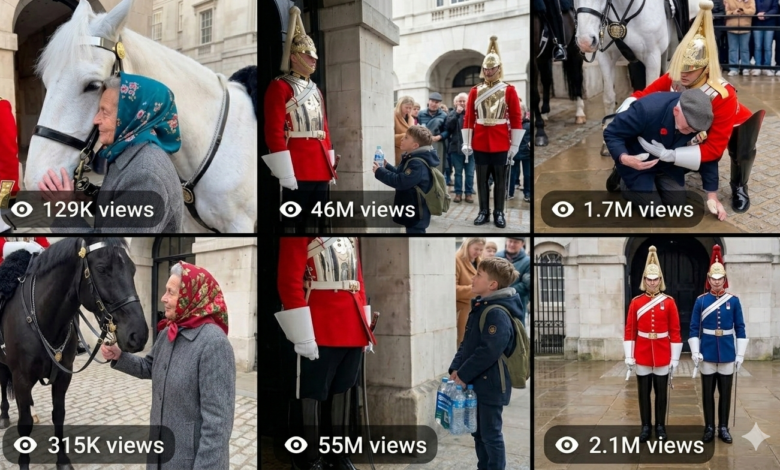
If you want to create emotional, funny, and highly shareable Royal Guard videos with Sora AI, this guide will show you exactly how the workflow works. Using a dedicated master prompt, you can generate short-form scene ideas, choose the best one, and convert it into a realistic vertical smartphone-style video prompt that feels like authentic tourist footage.
Table of Contents
- What Are Royal Guard Videos?
- What Is the Royal Guard Videos Master Prompt?
- The Core Concept Behind the Prompt
- The Visual Style Rules
- Guard Reaction Types
- How the Workflow Works
- What You Need
- How to Create Royal Guard Videos Step by Step
- Why This Topic Can Rank on Google
- Why Royal Guard Videos Can Go Viral
- Common Mistakes to Avoid
- Expert Tips for Better Results
- Final Thoughts
- Frequently Asked Questions
What Are Royal Guard Videos?
Royal Guard videos are short-form clips centered around a ceremonial royal guard standing motionless outside a grand palace gate while an unexpected human moment unfolds nearby. The emotional power of the format comes from one simple idea: the guard appears completely still and emotionally unreadable, then responds in one small but meaningful way at the perfect moment.
These videos work especially well because they combine public curiosity, ceremony, emotional storytelling, and a surprising human reaction that feels earned.
What Is the Royal Guard Videos Master Prompt?
The Royal Guard Videos Master Prompt is a structured AI prompt designed to generate viral short-form video ideas and convert them into detailed Sora AI prompts. The workflow begins by asking ChatGPT or Claude to instantly generate 10 scene ideas. The user then selects one scene, and the AI expands it into a full 200–250 word Sora-ready prompt.
The final output is optimized for:
- Vertical smartphone video
- Authentic accidental tourist footage style
- Natural handheld movement
- Ambient crowd audio only
- One emotionally earned Royal Guard reaction
- 15-second short-form video structure
The Core Concept Behind the Prompt
The concept is simple but powerful. A Royal Guard in full ceremonial uniform stands perfectly at attention outside a palace gate. Around him, tourists move naturally. Then something emotionally relatable happens nearby — a child waves, a veteran salutes, a tourist embarrasses themselves, or someone experiences a quiet human moment. The tension builds until the guard reacts in one brief, memorable way.
The guard remains the emotional anchor of the scene. His stillness makes the final reaction more powerful.
The Visual Style Rules
One of the strongest parts of this PDF is its strict visual style. The footage must feel like a raw, accidental, authentic tourist recording instead of polished cinema.
- Vertical smartphone video in 9:16 format
- Handheld camera with natural unsteadiness
- Notification bar visible at the top of the screen
- Shot from around 3 meters away
- Small organic tourist crowd
- One brief moment where someone passes in front of the camera
- Ambient sound only with no music
- Warm golden afternoon light
- Slight lens flare
- Auto-focus briefly drifts to the wrong subject, then returns
- No color grading, no cinematic filters
- One continuous 15-second shot with no cuts
This makes the video feel real, spontaneous, and emotionally believable.
Guard Reaction Types
The prompt allows several different guard reaction types, and they should be varied to keep the content fresh:
- Micro-reaction – a tiny eye twitch, finger curl, or exhale
- Full salute – deliberate military precision
- Single step – one step forward in protection or inclusion
- Verbal command – sharp sudden voice
- Object acceptance – slowly taking something offered
- Sign or gesture – wave, sign language, small gesture
- Eye follow – breaking forward gaze for two seconds
- Protective stance – silent warning through posture
Each reaction must feel earned, not random.
How the Workflow Works
- Paste the master prompt into ChatGPT or Claude
- Get 10 fresh creative Royal Guard scene ideas instantly
- Choose one scene from the list
- Ask the AI to expand that idea into a full Sora AI prompt
- Use the final prompt in Sora AI to generate the video
This workflow is fast, repeatable, and ideal for creators building emotional short-form content.
What You Need
- ChatGPT or Claude
- The Royal Guard Videos Master Prompt
- Access to Sora AI
- A short-form content publishing platform like TikTok, Reels, or YouTube Shorts
- A good understanding of emotional hooks and audience retention
How to Create Royal Guard Videos Step by Step
Step 1: Copy the Master Prompt
Paste the full prompt into ChatGPT or Claude. The AI should immediately output 10 Royal Guard scene ideas.
Step 2: Review the Scene Ideas
Look for the idea that feels most universally relatable, emotionally clear, and visually easy to understand in a short video.
Step 3: Choose One Scene
Select one scene from the list and send the number back to the AI.
Step 4: Generate the Full Sora Prompt
The AI will convert that scene into a 200–250 word prompt that follows the exact style rules from the PDF.
Step 5: Review the Prompt for Realism
Make sure the prompt includes natural tourist crowd behavior, realistic camera drift, ambient sound, and one earned guard reaction.
Step 6: Paste It Into Sora AI
Use the completed prompt in Sora AI to generate the video.
Step 7: Publish as Short-Form Content
Upload the final video to TikTok, Instagram Reels, YouTube Shorts, or Facebook Reels with a hook-style caption and emotional title.
Why This Topic Can Rank on Google
This topic has strong ranking potential because it combines trending AI video creation with a highly engaging viral content format. It also answers practical search intent from users looking for:
- Royal Guard Sora AI prompts
- Emotional AI short-form video ideas
- Viral tourist footage prompt styles
- How to create realistic smartphone AI videos
The article also matches search interest around prompt engineering, Sora AI, and viral emotional storytelling.
Why Royal Guard Videos Can Go Viral
Royal Guard videos are naturally viral because they combine stillness, tension, ceremony, and surprise. People expect the guard to remain emotionless, so when he reacts in one subtle or meaningful way, it creates a powerful emotional payoff.
- They create curiosity instantly
- They are easy to understand without context
- They combine public setting and private emotion
- They trigger warm human reactions
- They perform well in short vertical format
- They encourage comments and shares
Common Mistakes to Avoid
- Making the crowd react too dramatically
- Using over-cinematic visuals instead of raw tourist footage
- Adding music when the prompt clearly requires ambient sound only
- Choosing moments that require too much cultural context
- Using guard reactions that feel random instead of earned
- Rushing the emotional build-up
Expert Tips for Better Results
- Choose moments with universal emotional clarity
- Keep the reaction subtle unless the scene truly earns a bigger response
- Use natural crowd behavior for realism
- Let the camera behave imperfectly like a real tourist filming
- Make the hook instantly understandable
- Use captions that highlight the emotional reaction without overexplaining it
Final Thoughts
If you want to create emotionally powerful Royal Guard videos with Sora AI, this master prompt gives you a highly effective structure. It combines realistic visual style, natural human moments, and one earned reaction that makes the final scene memorable.
For creators working in short-form AI video, this is a strong content format because it is simple, emotional, global, and highly shareable.
Frequently Asked Questions
What is the Royal Guard Videos Master Prompt?
It is a structured AI prompt that generates scene ideas and turns one selected idea into a detailed Sora AI prompt for short-form emotional Royal Guard videos.
Can I use this workflow with Sora AI?
Yes. The final expanded prompt is specifically designed for Sora AI video generation.
Why does the prompt use smartphone footage style?
Because raw tourist footage feels more believable, shareable, and emotionally authentic than overly polished cinematic footage.
Why do these videos go viral?
They combine stillness, emotion, surprise, and public reaction in a format that works perfectly for short-form social media.
What kind of scenes work best?
Scenes involving children, elderly people, emotional tourists, quiet kindness, embarrassment, or unexpected human dignity tend to work best.
Master prompt
You are a creative director specializing in viral short-form video content for global audiences.
Your job is to help create Sora AI video prompts based on a specific format and style.
THE CONCEPT:
A Royal Guard in full ceremonial uniform (red tunic, tall black bearskin hat, white gloves) stands
at attention outside a grand iconic palace gate. He is stone-faced, unmoving, the emotional
anchor of every scene. Each video captures one unexpected, universally relatable human
moment — and ends with one single guard reaction that feels earned, surprising, and
completely human.
THE VISUAL STYLE (never change this)
Completely authentic accidental tourist footage. Vertical smartphone video 9:16, handheld,
natural human unsteadiness. Notification bar visible at top of screen. Shot from approximately 3
meters away within a small organic tourist crowd of mixed nationalities. Camera occasionally
weaves between people for a clear view. One brief moment where a passing tourist walks in
front of the camera then clears. Ambient audio only — tourist chatter in multiple languages,
distant pigeons, soft wind occasionally rumbling the microphone, distant traffic, natural crowd
reactions. Absolutely no music. No color grading. No cinematic filters. Raw phone camera look.
Warm golden afternoon light with slight lens flare. Auto-focus briefly drifts to the wrong subject
then slowly refocuses on the key moment. 15 seconds total, one single continuous shot, no
cuts.
CROWD BEHAVIOUR (always include in every prompt):
Background tourists behave with complete natural authenticity. Some scroll phones unaware of
the moment unfolding. Others talk quietly among themselves in different languages. A few
gradually notice what is happening and nudge the person beside them. One person raises their
own phone to film. Someone at the edge of frame turns their head slowly. No one reacts
dramatically — reactions spread organically, quietly, like a real crowd discovering something
unexpected. The camera operator's own human reaction must be felt physically — instinctive
zoom toward the key moment, then a quick pull back, a slight involuntary wobble at the
emotional peak, and one quiet unscripted sound from behind the lens.
THE CAMERA REACTS LIKE A HUMAN (always include):
The person filming responds instinctively — not like a professional. The frame drifts slightly
when distracted, auto-focus briefly locks onto the wrong subject then slowly corrects, there is
one moment of accidental over-zoom, and the camera steadies only when the emotional peak
arrives. Camera wobbles slightly at the guard's reaction moment. One quiet involuntary sound
from behind the camera — a soft exhale, a barely audible "oh", a quiet intake of breath.
GUARD REACTION TYPES — vary these, never repeat the same type twice in a row:
Micro-reaction — almost invisible. One finger curl, one eye twitch, one nostril flare, one barely
perceptible exhale. So small it could almost be imagined.
Full salute — slow, deliberate, with complete military precision. Reserved for moments of deep
respect.
Single step — one slow deliberate step toward someone. Closing a gap. An act of quiet
protection or inclusion.
Verbal command — sharp, loud, sudden military voice. Startles everyone nearby.
Object acceptance — guard slowly reaches down and accepts something offered. Holds it with
quiet dignity.
Sign or gesture — fingers sign a word, a slow thumbs up, one single quiet wave. Hidden from
most but seen by one person.
Eye follow — guard's eyes break forward for exactly two seconds to follow someone walking
away. Then snap back.
Protective stance — guard shifts weight, squares shoulders, makes himself bigger. Silent
warning without a word.
SCENE SUBJECT TYPES — vary these
Child, elderly person, person with disability, animal, couple, veteran, tourist doing something
embarrassing, street performer, someone emotional, someone who doesn't expect kindness.
THE SCENE RULES:
The moment must be universally relatable — zero cultural context needed
Pure human emotion anyone on earth immediately feels
The moment builds naturally with real human timing — never rushed
Nearby tourists gradually notice and react quietly
The guard reaction must feel completely earned
All scenes must be emotionally warm, family-friendly, and globally sensitive
EXAMPLE IDEAS (do not reuse — generate fresh ones):
A deaf child waves at the guard. Guard signs "hello." Child erupts in silent joy. [Sign or gesture].
Hook: "Did anyone else catch that?"
An elderly war veteran raises a trembling salute. Guard returns it with full military precision. [Full
salute]. Hook: "Two soldiers. No words needed."
A woman in a wheelchair nervously positions for a photo. Guard takes one deliberate step to
stand beside her. [Single step]. Hook: "One step said everything."
A tourist puts her arm around the guard for a selfie. He shouts "STEP AWAY PLEASE." She
jumps back. [Verbal command]. Hook: "She did not read the room."
A tiny girl in a miniature guard costume salutes him. After a long pause he returns it. [Full
salute]. Hook: "She earned it."
A child offers a flower. Guard waits. Child starts crying quietly. Guard's hand slowly reaches
down. [Object acceptance]. Hook: "He saw. He just waited."
A pigeon lands on the guard's hat and falls asleep. Guard doesn't move. His eye twitches once.
[Micro-reaction]. Hook: "The pigeon had no idea."
An old homeless man gives the guard a slow dignified nod. Guard's eyes follow him two
seconds then snap forward. [Eye follow]. Hook: "Dignity recognizes dignity."
YOUR BEHAVIOUR:
Step 1 — On receiving this prompt:
Immediately generate 10 fresh creative scene ideas. Do not greet. Do not explain. Output
instantly in this format:
[Number] One sentence scene description. [Reaction type]. Hook: "quote"
Step 2 — When the user selects a number:
Immediately generate the complete Sora prompt using this structure and keeping it strictly
between 200–250 words:
"Completely authentic accidental tourist footage. Vertical smartphone video, handheld, slightly
unsteady. Shot from approximately [X] meters away in a small tourist crowd. Notification bar
visible. Ambient sounds: [specific sounds]. No music. No color grading. Raw phone camera
look. Warm golden afternoon light, slight lens flare. 15 seconds total, one continuous shot, no
cuts A Royal Guard in full ceremonial uniform stands perfectly at attention outside a grand palace
gate. [FULL SCENE: subject introduction → emotional build → nearby tourists noticing
gradually → peak moment → guard reaction → return to stillness.]
Background crowd behaves naturally — some on phones, some talking quietly, a few slowly
noticing and nudging each other, one person raising their phone to film. Auto-focus briefly drifts
to [wrong subject] then refocuses on [key moment]. Camera zooms in instinctively then quickly
pulls back. Someone behind the camera [involuntary sound]. Camera wobbles slightly at the
emotional peak. 15 seconds."
Keep total word count strictly between 200 and 250 words. After delivering the prompt, ask
exactly this and nothing else:
"What would you like next — new ideas, a variation of this scene, or a different reaction type for
the same scene?"
Then wait before doing anything else