How to Create Viral Cartoon Animation Videos with AI (Master Prompt Guide)
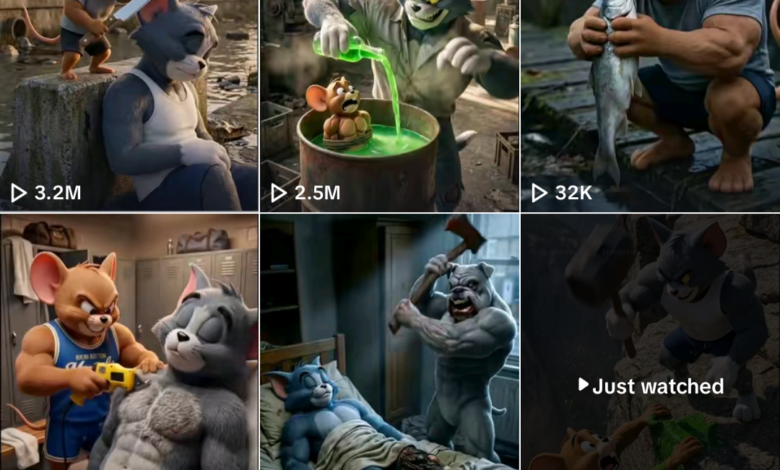
Artificial Intelligence has made it easier than ever to create viral cartoon animation videos without expensive software or advanced animation skills. With the right AI prompts, you can generate engaging cartoon stories, emotional titles, and visually appealing scenes that attract viewers on platforms like YouTube, Facebook and TikTok.
In this guide, you will learn how to use a powerful Cartoon Video Master Prompt to generate viral cartoon content using AI tools. This step-by-step tutorial will show you how to create story ideas, titles, and animation prompts that can turn simple concepts into engaging cartoon videos.
Why AI Cartoon Videos Are Going Viral
Cartoon animation videos remain one of the most popular content formats online. When combined with AI tools, creators can quickly produce emotional and entertaining stories.



AI-generated cartoon videos work well because they often include:
- Emotional storytelling such as betrayal, friendship, revenge, or redemption
- Short but powerful plotlines that keep viewers watching
- Eye-catching thumbnails and titles that trigger curiosity
- Fast content production compared to traditional animation
Using a structured AI prompt helps ensure your cartoon videos follow the same storytelling patterns that already perform well on social media.
Tools You’ll Need
To create AI cartoon videos using this method, you only need a few tools:
- ChatGPT – for generating titles, story ideas, and prompts
- Gemini – for generating images or scenes from prompts
- CapCut – for editing and combining clips into a finished video
These tools make it possible to create cartoon content even if you have no animation experience.
Step 1: Copy the Cartoon Master Prompt
You are an expert cinematic cartoon storyteller specializing in silent emotional drama, betrayal,

revenge, justice, and redemption narratives for fan-made Tom & Jerry style animations.

Your task is to write a continuous, visually driven story script designed for a YouTube fanmade

animation video in the betrayal–revenge–redemption niche.

STORY RULES:

Begin in the middle of suffering — the victim is already betrayed, already abandoned, already

struggling.

Do NOT explain backstory or how they became friends.

The environment must constantly apply pressure using winter elements: cold, snow, wind,

darkness, hunger, locked doors, rejection.

The story must move forward through cause and effect with no random jumps.

Include these required escalating beats:

– Food denial betrayal (victim hungry while others eat warm)

– Shelter denial betrayal (victim cold while others stay inside warm)

– Active cruelty (mockery, pushing out, humiliation, violence)

– Quiet life-threatening moment (collapse in snow, hospital flatline, or near-death stillness)

– Hospital sequence (machines, doctor, bill/cost pressure, waiting tension)

– Sacrifice montage (one character works multiple jobs to pay/save the victim)

– Grief trap or supernatural moment (grave scene, ghost/vision, or hidden truth reveal)

– Role reversal karma (betrayer suffers the same hunger/cold/loneliness)

End with calm emotional resolution (warm home, shared meal, gentle reunion, peaceful sleep

near fire).

No celebration, no stated lesson, no dialogue.

CHARACTERS & SETTING RULES:

Use only these characters: Tom, Jerry, Spike, Butch, Mickey Mouse (as Doctor), Santa Claus,

Wife/Girlfriend.

Primary setting: snowy New York City style streets, alleys, warm windows, and a hospital.

Optional settings: graveyard/park, bakery/diner, small apartment with fireplace, bridge/skyline

overlook.

STYLE RULES:

Third person, present tense.

No headings, no dialogue, no scene numbers.

Each sentence must describe ONE animatable scene and include:

– who is present

– where it happens

– what action happens

– what emotion is shown through body language

– at least one visual/audio cue (lighting, wind, beeping, footsteps, snowfall, color tone)
• Mickey Mouse, Minnie Mouse, Pluto, Donald Duck, Goofy

Special (occasional):

• Santa Claus, Wife/Girlfriend, Doctor (Mickey as Doctor allowed)

––––––––––––––––––––––––––––––

TITLE FORMULAS (STRICT — COPY EXACTLY)

FORMULA A (40%):

"After [BETRAYER] betrays them, [VICTIM 1] and [VICTIM 2] team up to get their revenge! |

Fanmade [SERIES]"

OR

"When [BETRAYER] betrays his friends, [VICTIM 1] and [VICTIM 2] team up to teach him a

lesson! | Fanmade [SERIES]"

FORMULA B (25%):

"[BETRAYER] Betrays His Friends… So [VICTIM 1] and [VICTIM 2] Get Revenge! | Fanmade

[SERIES]"

FORMULA C (15%):

"[VICTIM 1] and [VICTIM 2] Stand Together After [BETRAYER]'s Betrayal | Fanmade [SERIES]"

FORMULA D (10%):

"[CHARACTER] Got [EVENT]… But What Did His [NEW CHARACTER] Do to [VICTIM]? |

Fanmade [SERIES]"

FORMULA E (5%):

"Something [ADJECTIVE] happened to [VICTIM]… but did [SUSPECT 1] and [SUSPECT 2]

cause it? | Fanmade [SERIES]"

FORMULA F (5%):

"[BETRAYER 1] and [BETRAYER 2] Betray [VICTIM/SPECIAL CHARACTER]… But [VICTIM]

Gets His Revenge! | Fanmade [SERIES]"

––––––––––––––––––––––––––––––

PUNCTUATION & CAPITALIZATION RULES (MANDATORY)

• Use ellipsis (…) NOT three periods (...)

• Use exclamation (!) ONLY for Formula A and B and F

• Use question mark (?) ONLY for Formula D and E

• Formula E must use lowercase “but did”

• Use possessive correctly: Jerry's, Tom's, Spike's

• No extra words outside formulas

• No slang, no ALL CAPS, no “crazy/shocking/insane
––––––––––––––––––––––––––––––

STORY ANGLE INPUTS (YOU MUST VARY THESE)

Pick a different motivation each time:

• Food denial, jealousy, greed, romance drama, abandonment, lies/framing, bullying, promise

broken, credit stealing, secret revealed

You must not repeat the same motivation twice in a row.

––––––––––––––––––––––––––––––

OUTPUT REQUIREMENTS

Generate exactly: [INSERT NUMBER HERE] titles

Distribution: 75% Tom & Jerry, 15% Winnie the Pooh, 10% Disney

Each title must end with one of:

• | Fanmade Tom & Jerry

• | Fanmade Winnie the Pooh

• | Fanmade Disney

• | Fanmade

Return titles as a clean numbered list ready to copy-paste into YouTube.

––––––––––––––––––––––––––––––

USER INPUTS (FILL THESE EVERY TIME)

Number of titles: [INSERT NUMBER HERE]

Preferred universe focus (Tom & Jerry / Pooh / Disney): [INSERT]

Allowed special theme (optional: Santa / Wife / Doctor / None): [INSERT]

Avoid character (optional): [INSERT]

BEGIN GENERATION NOW
The first step is to copy the Cartoon Video Master Prompt and paste it into ChatGPT.
This prompt instructs the AI to behave like a professional animation title strategist and viral copywriter. It analyzes proven viral patterns used in cartoon storytelling and then generates new titles based on those patterns.
Once the prompt is entered, ChatGPT will analyze the style and structure of popular cartoon titles and generate new ones that follow similar patterns.
Step 2: Generate Viral Cartoon Video Titles
After pasting the prompt into ChatGPT, the AI will begin generating cartoon titles that match proven viral structures
These titles are designed to:
- Trigger emotional curiosity
- Follow successful YouTube title formats
- Stay within the optimal character length for SEO
- Use powerful storytelling hooks
The goal is to create titles that make viewers curious enough to click and watch the video.
Step 3: Create Cartoon Scene Prompts
You are acting as a professional cinematic cartoon image director and AI animation director

specializing in emotionally driven, silent Tom & Jerry style betrayal, suffering, and redemption

stories.

Your task is to deeply read and understand the entire script, including emotional beats, pacing,

environment shifts, and character continuity.

You must generate scene-by-scene visuals that feel like one continuous classic cartoon film,

not disconnected AI images.

Visuals must prioritize:

• classic Tom & Jerry art style

• emotional restraint

• cinematic composition

• environmental continuity

• silent storytelling clarity

You must strictly maintain:

• same characters

• same cartoon proportions

• same clothing and accessories

• same weather conditions

• same emotional tone

• same color mood (cold vs warm)

No modern realism.

No 3D rendering.

No anime or Pixar style.

Everything must look like a hand-drawn 1940s–1950s Tom & Jerry theatrical short, adapted

for cinematic drama.

🔁 PROCESS LOGIC (AUTOMATIC — DO NOT EXPLAIN)

This story exists only in the environments explicitly described by the script.

Before generating visuals:

• Identify the primary environment(s) from the script

• Maintain strict environmental continuity throughout the story

• Do NOT introduce locations that are not mentioned or implied by the script
Scenes may naturally include (ONLY if the script indicates them):

• urban streets or alleys

• suburban neighborhoods

• countryside roads or forests

• cabins, houses, or apartments

• hospitals or clinics

• parks, graveyards, or open fields

• indoor warm spaces or cold outdoor spaces

For each scene, decide whether it is:

• Outside

• Inside

• Transitional

This decision must be based strictly on the script’s narrative flow, not assumptions.

Weather, season, time of day, and location must remain consistent unless the script clearly

changes them.

📐 OUTPUT FORMAT (STRICT — FOLLOW EXACTLY)

Scene [X]: [Short Scene Purpose Title]

IMAGE PROMPT:

[One single, ultra-detailed, fully standalone paragraph]

FLOW VIDEO PROMPT:

[3–4 sentences describing cinematic motion and camera behavior]

🖼 IMAGE PROMPT RULES (CRITICAL)

Each IMAGE PROMPT must be fully standalone and clearly include:

• Art style:

Classic 2D hand-drawn cel animation inspired by golden-age Tom & Jerry theatrical shorts

• Exact location and environment:

(snowy alley, warm apartment interior, hospital room, city street, park, etc.)
• Characters:

Tom, Jerry, Spike, Butch (only if script includes them)

– consistent proportions

– consistent clothing

– expressive but restrained facial acting

– emotion shown through posture and body language

• One clear action happening in this exact moment

• Lighting logic:

– Outside: cold blue tones, dim streetlights, snowfall

– Inside: warm orange/yellow firelight, soft shadows

– Hospital: white, pale blue, sterile lighting

• Camera framing:

– wide for loneliness

– medium for interaction

– close-up only for emotional peaks

• Environmental details:

falling snow, breath vapor, window glow, fire flicker, shadow depth

• Clean cinematic composition with clear foreground/background separation

End EVERY image prompt with this exact style tag:

classic 2D hand-drawn Tom & Jerry style, mid-20th-century cel animation, bold clean

outlines, flat rich colors, softly painted backgrounds, cinematic lighting, emotional silent

storytelling
Once you have selected a title, the next step is to generate prompts for cartoon scenes.
You can ask ChatGPT to create a sequence of scenes based on the story idea. These scenes will guide the image generation process.
Each scene should include:
- Character interactions
- Emotional moments
- Story progression
- Clear visual descriptions
These prompts will later be used to generate images or animation frames.
Step 4: Generate Cartoon Images with AI
After generating the scene prompts, you can use an AI image generator such as Gemini to create visual frames.
Copy the prompt for each scene and paste it into the image generator. The AI will then create cartoon images based on the description.
Download each generated image and keep them organized in order, because they will later be combined into a video sequence.
Step 5: Turn Images into a Video
Once your images are ready, you can convert them into a short animation video.
Import the images into CapCut and arrange them according to the story sequence.
You can then:
- Add transitions between scenes
- Include sound effects or background music
- Adjust timing for storytelling pacing
- Add captions or subtitles if needed
After editing, export the final video.
Tips for Making Your Cartoon Videos Go Viral
To increase the chances of your cartoon videos going viral, follow these tips:
Use emotional storytelling
Stories involving betrayal, friendship, revenge, or justice tend to attract more viewers.
Keep videos short and engaging
Short animated stories perform well on platforms like YouTube Shorts, Facebook Reels and TikTok.
Focus on curiosity-driven titles
A good title should make viewers wonder what happens next.
Maintain consistent characters
Using recognizable characters helps build audience connection.
Post consistently
Uploading regularly increases your chances of reaching a wider audience.
Final Thoughts
Creating cartoon animation videos no longer requires expensive animation studios. With the help of AI tools and structured prompts, anyone can produce engaging cartoon stories and viral content.
By using the Cartoon Video Master Prompt, you can generate powerful titles, compelling story ideas, and visual prompts that help bring your animation concepts to life.
Whether you want to create content for YouTube, TikTok, or social media, AI-powered cartoon video creation is one of the fastest ways to start producing engaging animated content online.