How to Create Farming Animal Robot Videos with AI (Step-by-Step Master Prompt Guide
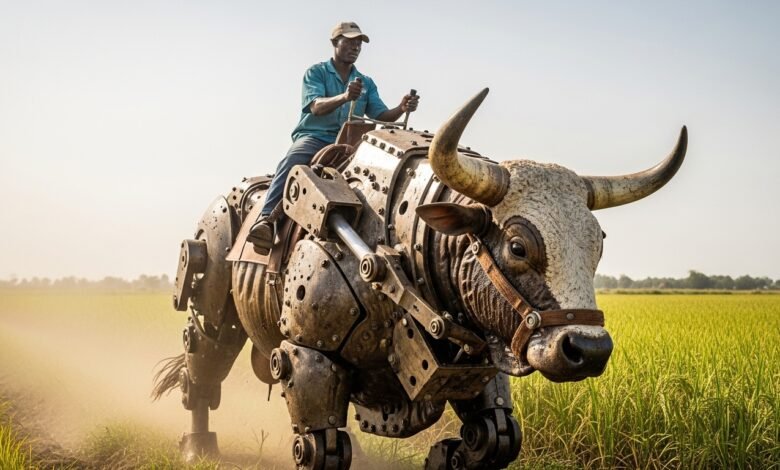
AI technology is making it possible to create hyper-realistic farming robot videos where massive animal-shaped machines help farmers perform agricultural tasks. These videos combine robotics, agriculture, and cinematic storytelling, making them perfect for viral content on social media.
In this guide, you will learn how to create farming animal robot videos using AI tools such as ChatGPT, Gemini, and Google Flow.
You will also get a powerful master prompt that automatically generates both image prompts and motion prompts for creating realistic agricultural robot videos


What Is a Farming Animal Robot Video?
A farming animal robot video is an AI-generated scene where a giant mechanical animal helps perform agricultural work on a farm.
Instead of traditional tractors or machines, the AI generates robot animals such as robotic bulls, robotic cows, robotic spiders, or robotic goats performing tasks like:
- Planting crops
- Harvesting grains
- Digging soil
- Spraying water
- Carrying farming tools
These robots appear massive, mechanical, and realistic, often with visible bolts, pistons, and metallic joints
The final result looks like a cinematic farming scene where a human farmer controls or rides a huge robotic animal.
Tools You’ll Need
To create a farming robot animal video, you need three main AI tools.
- AI Prompt Generator
Use ChatGPT to generate structured prompts for both the image and video.
ChatGPT will guide you through a workflow where you choose:
The robot animal
The farm crop and location
The action the robot performs
- AI Image Generator
Use an AI image generator such as Gemini or Nano Banana to generate the initial farming robot image.
The AI will combine your photo with the giant mechanical animal robot in the selected farming environment. - Image-to-Video Generator
Use Google Flow or Gemini’s video generation tools to convert the image into a cinematic farming robot video.
These tools animate the scene using the motion prompt generated by ChatGPT.
Farming Animal Robot Master Prompt
Copy the full prompt below and paste it into ChatGPT. This prompt will guide you through an interactive system that generates both image and motion prompts automatically.
Step-by-Step: How to Create the Video
Step 1: Paste the Prompt in ChatGPT
Paste the master prompt in ChatGPT.
ChatGPT will ask three questions.
- Step 2: Choose the Robot Animal
- For example:
- Goat robot
- Bull robot
- Spider robot
- Cow robot
- Step 3: Choose the Farm Crop and Location
- Examples include:
- Rice field in Nigeria
- Wheat farm in northern Nigeria
- Corn farm near hills
- Sugarcane farm near river
Step 4: Choose the Farming Action
Examples include:
Planting crops
Harvesting grain
Digging soil
Spraying water
Carrying tools
Once you answer all three questions, ChatGPT will generate two prompts:
Image Prompt
Motion Prompt
Step 5: Generate the Image
Copy the image prompt and paste it into an AI image generator such as Nano Banana or Gemini.
Upload your photo so the AI can combine it with the giant farming robot animal.
Download the generated image.
Step 6: Convert the Image to Video
Next, copy the motion prompt generated by ChatGPT.
Upload the image to an image-to-video generator such as Google Flow.
Paste the motion prompt and wait for the AI to animate the scene.
The result will be a cinematic farming robot video.
Why Farming Robot Videos Can Go Viral
Farming robot videos can go viral because they combine:
- futuristic agricultural technology
- giant mechanical animal robots
- realistic farming environments
- cinematic AI animation
These elements create unique content that attracts viewers on Facebook,YouTube, TikTok, and Instagram.