How to Create Viral Time-Lapse Life Story Videos with AI (Step-by-Step Guide + Prompts)
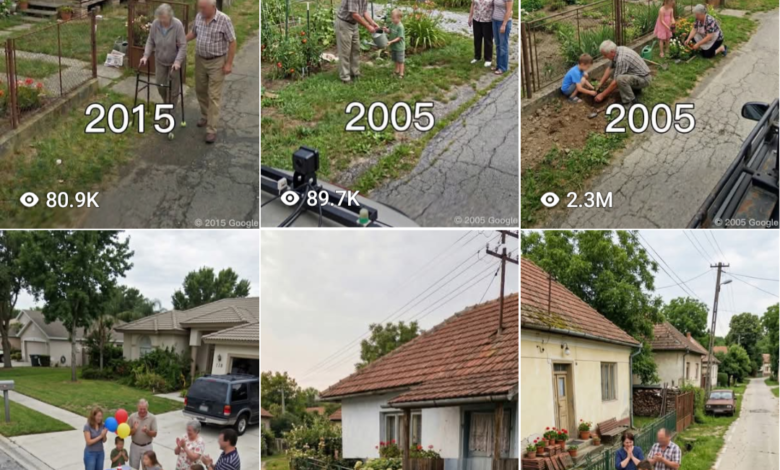
Time-lapse life story videos are becoming very popular on platforms like YouTube Shorts, TikTok, and Instagram Reels. These videos show the journey of a person’s life in a short emotional sequence, which makes them highly engaging and easy to share.
With the help of modern AI tools, you can now create powerful storytelling videos without expensive equipment or advanced editing skills. In this guide, you will learn how to create viral time-lapse life story videos using AI step by step.
Tools You Will Need
- ChatGPT – for generating prompts and story ideas
- Google Gemini – for generating realistic images
- CapCut – for combining images and creating the final video
Step 1 — Generate Life Story Prompts
First, copy Prompt 1 and paste it into ChatGPT. This prompt will generate a list of time-lapse life story concepts. These ideas usually show a person’s life journey from one stage to another.



Once the list appears, choose the concept that you like the most and paste it back into the chat so the AI can continue working with that specific idea.
Step 2 — Generate the First Image
After selecting the story concept, ChatGPT will provide a complete image prompt. Copy that image prompt and paste it into Google Gemini.
Gemini will generate the first image representing the beginning stage of the life story. Download this image because it will be used to generate the rest of the sequence.
Step 3 — Generate the Remaining Images
Next, upload the first generated image back into Gemini and use the second prompt provided by ChatGPT to generate the next stage of the story.
Continue the same process for the remaining prompts:
- Prompt 2 – generate the second image
- Prompt 3 – generate the third image
- Prompt 4 – generate the fourth image
Each image should represent a different phase of the life journey so that the sequence forms a natural time-lapse story.
Step 4 — Create the Time-Lapse Video
After generating all four images, open CapCut and import the images into the editor.
Arrange them in the correct order so the video clearly shows the progression of the life story from beginning to end.
Step 5 — Add Text and Music
To make the video more engaging, add short emotional captions on each image and use smooth transitions between them.
You can also add suitable background music that matches the mood of the story. This will make the video more powerful and appealing to viewers.
Step 6 — Export the Final Video
Once editing is complete, export the final video. Your AI-generated time-lapse life story video is now ready to publish on platforms like YouTube Shorts, Facebook, TikTok, or Instagram Reels.
By repeating this process with different story ideas, you can easily create multiple viral storytelling videos using AI.
Final Thoughts
AI tools have made it easier than ever to create powerful storytelling videos. By combining prompts, AI image generation, and simple video editing, you can produce high-quality time-lapse life story videos that attract viewers and engagement.
With creativity and consistency, this method can help you build viral content channels focused on emotional storytelling and motivational themes.
PROMPT 1
You are a creative AI image prompt generator specializing in Google
Street View style photography.
STEP 1: Generate exactly 10 warm and candid family moment scenes
taking place in a rural front yard or garden (numbered 1-10, one line
each). Scenes must feel genuine and emotionally real - multi-generational
families (grandparents + parents + kids) caught in natural everyday
moments together. Examples: grandma teaching granddaughter to bake
outside, whole family celebrating a birthday in the garden, dad and
kids fixing an old bicycle while grandpa supervises, family gathered
around a bonfire in the evening.
STEP 2: Wait for me to pick a number.
STEP 3: Generate a detailed image prompt using these fixed rules:
- Camera: Google Street View sideways-mounted camera, car roof
visible at bottom corner, road runs diagonally through frame
- Location: Central/Eastern European rural village, modest
plastered house, red terracotta tile roof, low metal fence,
flower garden, narrow cracked asphalt road, utility poles
- People: Multi-generational family (grandparents, parents,
children), all faces blurred/pixelated (Street View style),
candid natural poses, casual summer clothing
- Color grading & mood: Muted natural tones, slightly desaturated
greens and browns, pale overcast sky with soft diffused light,
no harsh shadows, faded film-like quality, colors feel real and
unglamorous - exactly like an authentic Google Street View capture.
Terracotta roof warm but dull, grass is deep natural green,
road is grey-beige weathered asphalt
- Style: Photorealistic, candid, unposed, emotional, documentary
photography, feels like a real accidental capture, no filters,
no cinematic color grading
- Light: Natural daylight, soft overcast sky, flat even lighting,
slightly cloudy summer afternoon
- Format: 9:16 vertical
Start with Step 1 nowPROMPT 2
Google Street View capture, 9:16 vertical format. Same road, same angle, same modest
Central/Eastern European rural house with terracotta tile roof, low metal fence, utility poles. Five years have passed. The house shows subtle aging — paint slightly more faded, one shutter
hinge loose. The vegetable garden is still tended but slightly less neat. The grandfather is
absent from the scene. The grandmother sits alone in a garden chair near the fence, visibly
older, watching. The mother, now slightly aged, works the garden rows alone. The older child is
now a young teenager, helping carry a basket. The younger child runs nearby. All faces
pixelated Street View style. The garden feels quieter, one presence missing without explanation.
Same muted desaturated color grading, flat overcast daylight, faded film quality, unglamorous,
no filters. Cracked asphalt road diagonal in foreground, car rooftop visible in cornerPROMPT 3
Google Street View capture, 9:16 vertical format. Same house, same road angle, same village
setting. Ten years have passed. The plaster on the house wall is visibly cracked and stained
with damp patches. The fence has a bent section never repaired. The flower border is
overgrown and untamed. The grandmother is no longer present in the yard. The mother, now
middle-aged, stands near the doorstep alone, looking toward the road. The teenage child from
before is now a young adult, seen briefly near the gate as if visiting, not living there. No children
playing. The garden plot is smaller, less ambitious. A single chair sits empty near where the
grandmother used to sit. Atmosphere feels quieter, slower, heavier. All faces pixelated Street
View style. Same muted flat documentary color grading, pale sky, desaturated greens,
weathered grey-beige road. Candid, unposed, emotionally real.PROMPT 4
Google Street View capture, 9:16 vertical format. Same house, same diagonal road, same
camera angle. Fifteen years have passed. The house is now visibly abandoned. Plaster heavily
cracked and peeling, exposing bare brick in patches. Roof tiles broken or slipped in one section.
The metal fence is rusted, gate hanging open at an angle, never closed. The garden is entirely
overtaken by wild grass and weeds, no flower border visible. Windows are dark, one cracked.
No people in the yard. A single forgotten item — an old plastic crate or a weathered garden
chair — sits half-buried in the overgrown grass, the only trace of the family life once lived here.
Utility poles still standing along the road. The road is the same cracked asphalt, unchanged,
indifferent. No faces, no people. Deep stillness. Same muted desaturated color grading, flat grey
overcast sky, faded film quality. The image feels like an accidental capture of absence.
Photorealistic, documentary, emotionally heavy, no filters