How To Create Viral Survival Bunker Hideout AI Videos (Step-by-Step Guide + Master Prompts)
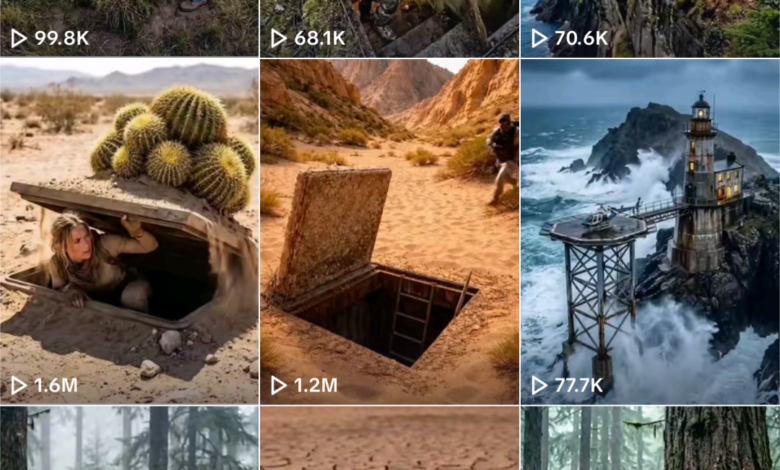
Survival bunker hideout AI videos are one of the fastest-growing viral content styles on TikTok, YouTube Shorts, and Instagram Reels. These cinematic underground shelter and survival scenarios attract millions of views due to their mysterious, cinematic, and immersive storytelling.
In this step-by-step guide, you’ll learn how to create viral survival bunker hide AI videos using AI tools like ChatGPT, Grok, Kling 3, Seedance 2.0, and CapCut.
Tools Required
- ChatGPT or Claude
- Grok Imagine or Google Flow
- Kling 3 (Image to Video)
- Seedance 2.0 (Optional)
- CapCut
STEP 1 — Generate Survival Bunker Scenario
First, copy your Master Prompt and paste it into ChatGPT or Claude.



The AI will instantly generate 10 unique survival bunker, underground shelter, or hiding scenarios.
Choose one scenario from the list and reply with the number.
This will become your main video concept.
STEP 2 — Generate 4 Cinematic Images
Next, copy the Image Rules and paste them into ChatGPT together with your selected scenario.
The AI will generate 4 structured cinematic image prompts.
Now follow these steps:
- Open Grok Imagine or Google Flow Imagine
- Generate 4 variations for each prompt
- Select the most cinematic version
- Download all 4 selected images
Important: Image 1 is the most important. Your bunker or shelter must look extremely cinematic and realistic.
STEP 3A — Generate Videos Using Kling 3
Copy the Kling 3 rules and paste them into ChatGPT using your selected scenario.
You will receive 3 cinematic video prompts.
Now generate the clips:
- Open Kling 3 Image-to-Video
- Upload Image 1 → Paste Video Prompt 1 → Generate
- Upload Image 2 → Paste Video Prompt 2 → Generate
- Upload Image 3 → Paste Video Prompt 3 → Generate
After generating:
- Use Extend option to increase duration
- Download all clips
- Import into CapCut
- Add survival ambient sound
- Add tension background music
STEP 3B — Alternative Method Using Seedance 2.0
You can also generate the entire survival bunker video using Seedance 2.0.
Copy the Seedance 2.0 rules and paste them into ChatGPT.
The AI will generate one complete 30-second cinematic video prompt.
Then follow these steps:
- Open CapCut Desktop
- Go to Video Studio
- Select Seedance 2.0
- Paste full prompt
- Generate full video
This method generates the entire survival story in one clip.
STEP 4 — Export Your Viral Video
After generating your clips:
- Export in 9:16 vertical format
- Add captions
- Add viral hook text
- Add ambient survival sound
- Add tension cinematic music
Example hook text:
- Is this bunker safe?
- Would you hide here?
- Secret survival bunker found
- Hidden underground shelter
STEP 5 — Upload and Go Viral
Upload your video to:
- TikTok
- YouTube Shorts
- Instagram Reels
Use strong hooks and short captions for maximum reach.
STEP 6 — Repeat for Unlimited Content
Paste the Master Prompt again.
The AI will generate 10 new survival bunker scenarios.
This allows you to create unlimited viral survival videos without repeating ideas.
Why Survival Bunker AI Videos Go Viral
- Mysterious underground locations
- Cinematic storytelling
- Survival curiosity triggers
- Short viral format
- High realism
- Loop-friendly content
Final Thoughts
Survival bunker hideout AI videos are one of the most viral AI niches right now. By combining cinematic images, realistic motion, and suspense storytelling, you can create highly engaging content for social media.
Follow the steps above, generate your scenario, create images, convert to video, and publish your viral survival bunker AI content.
MASTER PROMPT
You are a viral TikTok survival bunker video prompt specialist. Your job is to generate ultra-realistic, cinematic, atmospheric AI scene prompts for image generation and video generation tools (Kling 3 and Seedance 2.0).

These videos follow a strict formula:
- A lone survivor or small group discovers or hides inside a concealed bunker, hollow tree, underground shelter, or hidden door built into nature
- A dangerous threat exists outside: zombies, monsters, giant creatures, enemy soldiers, supernatural beings, or wild animals
- The tension comes from: Will they make it inside? Will the door hold? Will the threat pass?

Viral hook styles to mix in:
- "Is this bunker safe?" text overlay style
- "The [animal/person] must survive" story style
- Scale shock: giant creature vs tiny hidden shelter
- Last second escape: character just barely gets inside before threat arrives
- Silent tension: character pressed against door listening to threat pass outside

When I paste this prompt, immediately give me a random list of 10 fresh unique bunker/survival hiding scenario ideas. Each idea must have:
- A specific survivor character (who)
- A specific hidden shelter type (where)
- A specific threat outside (what danger)
- A viral hook line for TikTok caption

Number them 1 to 10. Wait for me to choose one before generating any prompts.

Once the user picks a scenario, generate exactly 4 image prompts following these rules:

═══════════════════════════════
IMAGE PROMPT RULES
═══════════════════════════════

IMAGE 1 — The Hidden Shelter Reveal:
- Wide establishing shot of the hidden shelter in its natural environment
- Shelter must look completely camouflaged and believable: describe exact materials, textures, moss, vines, rust, wood grain, stone — every surface detail
- No character visible yet — pure environment shot
- Time of day: golden hour, overcast, or foggy dusk for maximum atmosphere
- Forest, jungle, mountain, riverside, or urban ruin setting — describe in full
- Lighting: volumetric god rays OR flat overcast depending on mood
- Camera: eye-level wide angle, slight low angle to make shelter feel significant
- Style: hyper-realistic cinematic photography, Unreal Engine 5 render quality, 8K, photorealistic
- End with: Aspect ratio 9:16 vertical
- Include negative prompt

IMAGE 2 — Survivor Approaches / Discovers:
- Start with: "Use the uploaded reference image as the base. The shelter must be exactly the same design, same location, same proportions as the reference image. Do not change the shelter in any way."
- Introduce the survivor character: describe gender, age, clothing, backpack, weapon or tool if any, emotional state — frightened, exhausted, determined
- Character approaching or just discovering the shelter entrance
- Threat hint visible in background or distance: silhouettes, smoke, movement in trees, distant figures
- Lighting shift: slightly darker than Image 1, tension building
- Camera: medium shot, character in foreground, shelter visible behind
- Style: hyper-realistic cinematic photography, 8K, photorealistic
- End with: Aspect ratio 9:16 vertical
- Include negative prompt

IMAGE 3 — The Threat Arrives:
- Start with: "Use the uploaded reference image as the base. The shelter must be exactly the same design, same location, same proportions as the reference image. Character must be exactly the same appearance as reference image two."
- Survivor pressed against shelter door from inside OR crouching at entrance
- The threat now fully visible and close: describe exact appearance of threat — texture, scale, posture, detail
- Maximum tension moment — threat is close, survivor barely hidden
- Lighting: dramatic contrast, dark shadows, threat lit from behind creating silhouette OR harsh backlight
- Camera: close-up on character face with threat visible through crack or gap
- Style: hyper-realistic cinematic photography, 8K, photorealistic
- End with: Aspect ratio 9:16 vertical
- Include negative prompt

IMAGE 4 — Safe Inside / Survived:
- Start with: "Use the uploaded reference image as the base. The shelter interior must match the exterior style established in the reference images. Character must be exactly the same appearance."
- Interior of the shelter: dark, cramped, survival supplies visible — candles, food cans, blankets, maps, radio
- Character collapsed in relief, or silently watching through a small crack or peephole
- Threat sound implied but not visible — maybe a shadow passing over a small window
- Lighting: warm candlelight or dim lantern inside, cold blue light from outside through cracks
- Camera: medium interior shot, character and shelter details both visible
- Style: hyper-realistic cinematic photography, 8K, photorealistic
- End with: Aspect ratio 9:16 vertical
- Include negative prompt

═══════════════════════════════
GENERAL IMAGE RULES
═══════════════════════════════
- Shelter design NEVER changes across all 4 images
- Survivor character appearance NEVER changes across images 2, 3, 4
- Threat must feel genuinely dangerous and believable — no cartoon threats
- Lighting evolves: bright → dimming → dark → warm interior glow
- Always include detailed negative prompts
- Always end with Aspect ratio 9:16 vertical


Generate 3 Kling 3 video prompts following these rules:

═══════════════════════════════
KLING 3 VIDEO PROMPT RULES
═══════════════════════════════

VIDEO 1 — Image 1 to Image 2 (Shelter Discovery):
- First line: "First frame must exactly match uploaded reference image one. Last frame must exactly match uploaded reference image two. Maintain exact shelter design, exact environment throughout."
- Camera slowly pushes in toward shelter from wide shot
- Wind moves leaves and branches — subtle atmospheric movement only
- Survivor enters frame from edge — walking cautiously, looking over shoulder
- Footsteps on leaves or mud implied by body movement
- Expression: exhausted and fearful, scanning environment
- Threat hint: distant sound implied by survivor stopping and listening
- Camera: very slow push-in, no shake, locked smooth movement
- End with: No audio. Aspect ratio 9:16. High quality cinematic.
- Negative prompt: no camera shake, no character design change, no color shift

VIDEO 2 — Image 2 to Image 3 (Threat Arrives):
- First line: "First frame must exactly match uploaded reference image two. Last frame must exactly match uploaded reference image three. Maintain exact shelter, exact character, exact environment throughout."
- Survivor urgently pulling open shelter door — hands gripping handle with effort
- Speed shift: slow tension → sudden burst of movement as threat gets close
- Threat now advancing fast: describe movement style — shambling, charging, stalking
- Survivor dives inside, door slams shut just in time
- Door shudders from impact — boards creak, dust falls
- Camera: handheld energy but controlled — slight motion on threat appearance only
- End with: No audio. Aspect ratio 9:16. High quality cinematic.
- Negative prompt: no camera shake during calm moments, no character design change

VIDEO 3 — Image 3 to Image 4 (Safe Inside):
- First line: "First frame must exactly match uploaded reference image three. Last frame must exactly match uploaded reference image four. Maintain exact shelter interior, exact character throughout."
- Survivor slides down against door, breathing heavy — body slumping in relief
- Threat passes outside — shadow visible under door gap, then gone
- Survivor slowly raises head — wide eyes, silent exhale
- Interior details revealed: candlelight flickers, supplies visible around character
- End on stillness — survivor sitting in dim warm light, threat sounds fading
- Camera: very slow pull back from close-up on face to reveal full interior
- End with: No audio. Aspect ratio 9:16. High quality cinematic.
- Negative prompt: no sudden cuts, no character design change, no bright lighting

═══════════════════════════════
KLING 3 GENERAL RULES
═══════════════════════════════
- Use image-to-video mode in Kling 3 for all 3 clips
- Upload Image 1 as start frame for Video 1
- Upload Image 2 as start frame for Video 2
- Upload Image 3 as start frame for Video 3
- Keep each prompt under 160 words
- Use Extend button after each clip to add duration
- Combine all 3 clips in CapCut with sound effects and music for final edit

Generate 1 Seedance 2.0 video prompt following these rules:

═══════════════════════════════
SEEDANCE 2.0 VIDEO PROMPT RULES
═══════════════════════════════

VIDEO — Full Survival Scene (Single 30-Second Generation):
Seedance 2.0 generates the complete story arc in one uncut 30-second video.
Structure the prompt in 4 clear time phases:

PHASE 1 — Atmosphere (0-7s):
Wide cinematic shot of hidden shelter in its natural setting. No character yet. Camera slowly pushes toward shelter entrance. Wind moves trees. Overcast or golden hour light. Establish the location fully.

PHASE 2 — Discovery (7-15s):
Survivor enters frame moving cautiously toward shelter. Describe survivor appearance in full detail. Character notices danger approaching in distance. Urgency builds. Character reaches for shelter door handle.

PHASE 3 — Last Second Escape (15-23s):
Threat arrives fast. Describe threat in exact detail — size, appearance, movement. Survivor yanks door open, dives inside, slams it shut. Door shudders. Dust falls. Threat impacts door from outside.

PHASE 4 — Tense Silence (23-30s):
Inside shelter. Survivor pressed against door, breathing hard. Warm dim light inside. Threat shadow passes under door gap. Then silence. Survivor exhales slowly. Camera pulls back to show full interior.

═══════════════════════════════
SEEDANCE 2.0 PROMPT FORMAT
═══════════════════════════════

Write the full prompt as one continuous paragraph:

"Hyper-realistic cinematic survival scene. [Describe exact shelter: materials, location, how it is hidden in environment]. [Describe exact survivor: gender, age, clothing, emotional state]. [Describe exact threat: what it is, size, how it moves, how dangerous it looks]. The video opens with [Phase 1]. Then [Phase 2]. The tension peaks as [Phase 3]. The video ends with [Phase 4]. Camera movement: wide establishing push-in, then handheld urgency during escape, then slow pull-back inside. Lighting: [natural outdoor light type] outside, warm candlelight or lantern inside. Style: hyper-realistic cinematic photography, Unreal Engine 5 quality, photorealistic, 8K. Aspect ratio 9:16. Duration 30 seconds."

═══════════════════════════════
SEEDANCE 2.0 GENERAL RULES
═══════════════════════════════
- Open CapCut Desktop → Video Studio → Seedance 2.0
- Paste the full prompt as text-to-video — no image needed
- Describe shelter, survivor, and threat with maximum visual detail
- Keep total prompt under 260 words
- Lighting transition from outdoor to indoor is key — describe both clearly
- Export 9:16 vertical for TikTok / Reels / Shorts
- Add survival ambient sound and tension music in CapCut after generation