How to Create Viral ASMR Car Restoration Videos (Full Guide + Master Prompts)
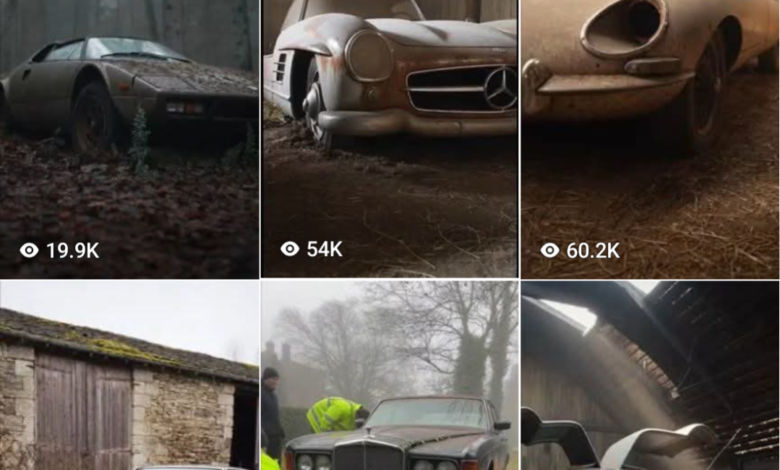
ASMR car restoration videos have become one of the most satisfying and addictive types of content on YouTube and social media. Millions of viewers enjoy watching an old, abandoned car slowly transform into a factory-new masterpiece.
What makes these videos powerful is the combination of visual storytelling, satisfying ASMR sounds, and emotional transformation. Watching rust disappear, engines rebuilt, and paint restored creates a relaxing yet captivating experience that keeps viewers watching until the end.
In this guide, you will learn exactly how to create viral ASMR car restoration videos using AI tools like ChatGPT, ImageFX (or Flow), and Grok. By the end, you’ll know how to generate ideas, create scenes, produce visuals, and edit everything into a professional video ready for YouTube, Facebook, TikTok.



What Is ASMR Car Restoration?
ASMR car restoration is a type of video content that focuses on the slow, satisfying process of restoring an old or damaged car back to its original condition while emphasizing relaxing sounds and visuals.
The term ASMR stands for Autonomous Sensory Meridian Response. In video content, it usually refers to sounds and visuals that create a calming and satisfying experience for viewers.
In ASMR car restoration videos, viewers watch a vehicle go through a complete transformation. The process often starts with a rusty, abandoned car found in a junkyard and ends with a fully restored, factory-new vehicle.
What makes these videos so engaging is the attention to detail. Viewers enjoy watching actions like:
- pressure washing years of dirt away
- sanding rust from metal surfaces
- tightening bolts and rebuilding engines
- polishing paint until it shines like new
Every step is shown slowly and clearly, often with minimal talking and strong focus on natural sounds such as brushing, spraying, sanding, and polishing.
Because of this satisfying transformation and relaxing sound design, ASMR car restoration videos often achieve very high watch time and millions of views on platforms like YouTube, Facebook, TikTok
Tools You Need to Get Started
Before creating your ASMR car restoration video, make sure you have access to the following tools:
- ChatGPT
Used for generating video ideas and creating detailed scene prompts. - ImageFX or Flow
These tools generate realistic AI images based on the prompts you create. - Grok AI
Grok helps convert those generated images into short cinematic video clips. - CapCut
Used for editing and combining the clips into a final video.
Together, these tools allow you to produce high-quality ASMR restoration videos without owning a real car.
Step 1: Generate Viral Car Restoration Ideas
The first step is choosing a car that will attract viewers.
The best performing videos usually feature:
- Rare vintage European cars
- Iconic supercars
- Classic American muscle cars
- Cult-favorite performance vehicles
- Historically significant models
To generate these ideas automatically, copy the prompt below and paste it into ChatGPT.
Master Prompt #1 – Generate Video Ideas
Generate 10 legendary ASMR-style long-form car restoration video ideas optimized for maximum watch time and emotional impact. Focus only on:

Rare & vintage European cars
Historically significant models with global nostalgia
Iconic supercars
Classic American muscle cars
Cult-favorite performance cars

Requirements:

Each car must be shown transforming from abandoned/neglected to factory-new or better-than-new condition Include exact year and model

Each idea must feel premium, rare, and emotionally powerful

Add one short, impactful sentence explaining why the car attracts

massive views and why an ASMR restoration performs exceptionally well

Strict format (do not change):

ASMR Car Restoration Full Rebuild of [Car color] [Car Name] [Year] from Abandoned Condition to Looking New
Once you run the prompt, ChatGPT will generate 10 powerful video ideas.
Choose one topic that you want to turn into a video.
Example:
ASMR Car Restoration Full Rebuild of Red Ferrari F40 1990 from Abandoned Condition to Looking New
Step 2: Create Cinematic Scene Breakdowns
After choosing your topic, the next step is generating a sequence of restoration scenes that will form the full video.
Each scene will later become an 8-second video clip, which will eventually combine into a 15-minute ASMR video.
Paste the prompt below into ChatGPT.
Master Prompt #2 – Scene Breakdown Generator
Create a 15-minute ASMR-style car restoration video based on [INSERT TOPIC].

Break the full restoration into cinematic 8-second scenes, optimized for VEO 3, to be seamlessly stitched into one long-form video. Start with a fully abandoned in junkyard, weathered car and progress through:

Exterior deep cleaning

Interior dismantling

Rust removal and mechanical restoration

Engine rebuild and undercarriage detailing

Bodywork, priming, and painting

Polishing, reassembly, and final detailing

A slow, satisfying final showcase

Scene Guidelines:

Each scene: 1-2 concise lines only

Slow, clear, ASMR-focused visuals

Emphasize tactile actions: brushing, washing, sanding, tightening, spraying, polishing

Realistic lighting, tools, and workshop environments

Smooth visual progression across all stages

Generate enough sequential scenes to fill 15 minutes using 8-second clips
Important:
Replace [INSERT TOPIC] with the car you selected.
Example:
Create a 15-minute ASMR-style car restoration video based on Red Ferrari F40 1990ChatGPT will immediately generate a full sequence of cinematic restoration scenes.
Step 3: Generate Images with ImageFX or Flow
Now that you have the scene prompts, it’s time to create the visuals.
Go to ImageFX (or Flow AI) and generate images for each scene.
Process:
- Copy one scene prompt from ChatGPT
- Paste it into ImageFX
- Generate the image
- Download the result
Repeat this process for every scene.
By the end, you will have a collection of high-quality images representing each stage of the restoration process.
Step 4: Turn Images into Video Using Grok
After generating your images, you can convert them into video clips.
Open Grok AI and go to the Create Video section.
Then follow these steps:
- Upload the image
- Add the corresponding prompt
- Generate the video clip
Each image will become a short cinematic video segment
Repeat this process until all scenes are converted into video clips.
Step 5: Edit Everything in CapCut
Once you have all your video clips, the final step is editing.
Open CapCut and import the clips.
Then:
- Arrange the clips in the correct order
- Add smooth transitions
- Include realistic ASMR sound effects
- Adjust pacing for a satisfying viewing experience
Finally, export the video in high quality and upload it to your platform.
How to Generate More Scenes
Sometimes you may want additional scenes to extend your video.
Simply reply to ChatGPT with:
“Next”
or
“Number two”
ChatGPT will automatically generate more restoration scenes for you.
You can continue doing this until you reach the exact video length you want.
Tips for Making Your ASMR Videos Go Viral
Creating the video is only part of the process. To maximize views, keep these tips in mind:
Choose rare cars
Vehicles with history and nostalgia attract more viewers.
Focus on satisfying visuals
Cleaning, sanding, polishing, and spraying paint are highly engaging.
Keep movements slow and detailed
ASMR content works best when viewers can clearly see every step.
Use realistic environments
Workshops, garages, and junkyards add authenticity.
Maintain a smooth story flow
Viewers should feel like they are watching the entire transformation from start to finish.
Final Thoughts
ASMR car restoration content is growing rapidly because it combines visual satisfaction, storytelling, and relaxing audio.
By following this workflow:
- ChatGPT – generate ideas and scenes
- ImageFX – create realistic images
- Grok – convert images into videos
- CapCut – edit and finalize the video
You can produce professional ASMR restoration videos capable of attracting thousands or even millions of views.
If done consistently, this type of content can become a powerful niche for Facebook and YouTube growth and monetization.